bAIbelAV
/av/review10 / 11 · RESOLVED

Review

Reviewing your own work is hard for a simple reason: you have read the sentence four times, you know what you meant, and that is exactly why you cannot see what you wrote.

Two kinds of help, and both leave the decision with you: an AI model that reads a section against its source and reports, and a rule you wrote once that stops a segment being confirmed while it is unsatisfied.

In numbers

2checks, named: accuracy and style
1refusal that protects an edit you made by hand
0findings lost when you close a section and come back

The AI model reads it back

An AI model reads a section against its source, and reports.

Two checks, named: accuracy and style. Each finding says which segment it is about, what it thinks is wrong, and what it would do instead.

See it in the applicationHide the screenshot
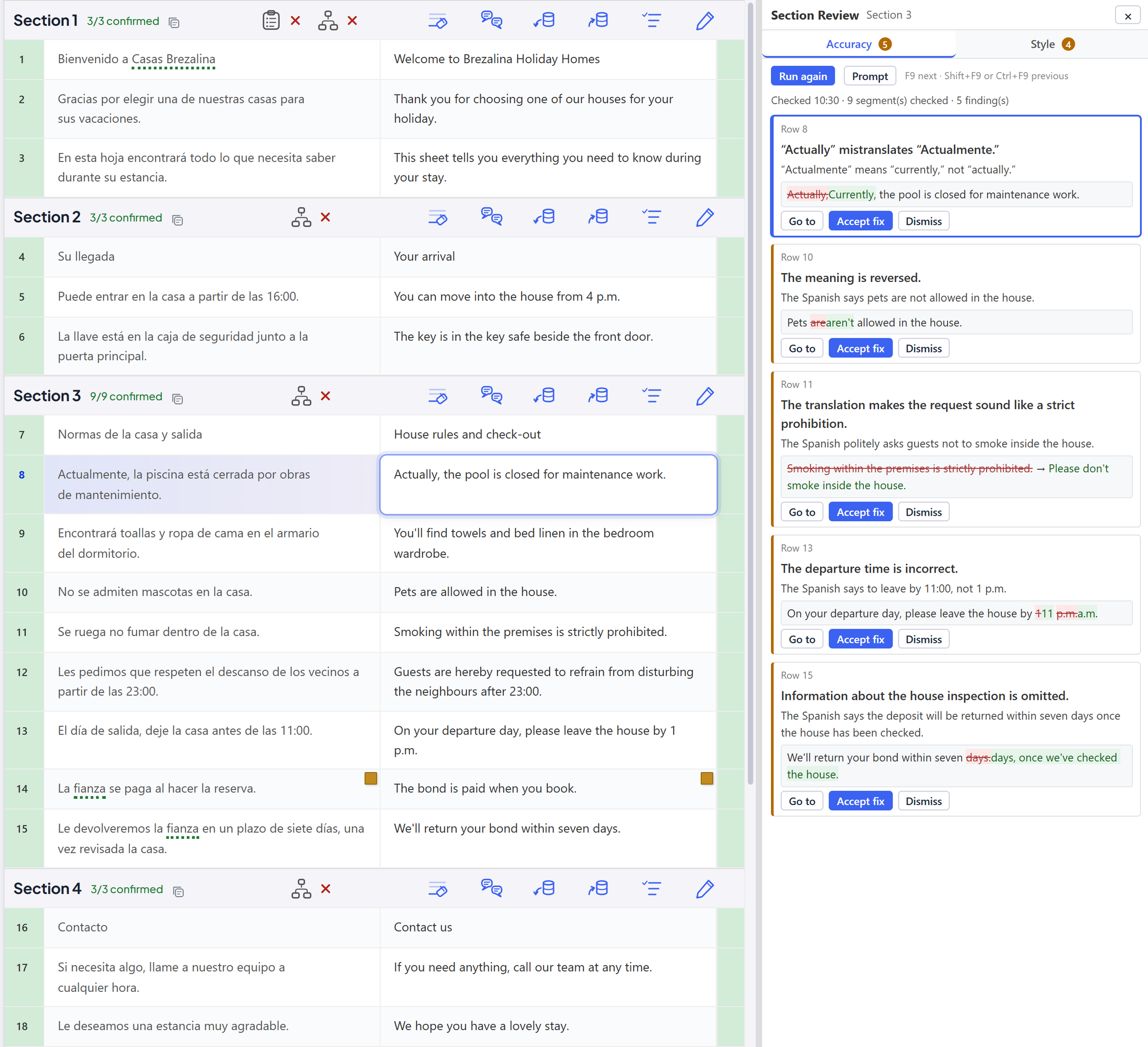
That the findings sit beside the translation rather than replacing it, that each one names its segment, and that only the AI model’s own fix carries an Accept — the target cell is still an ordinary cell you type in
Section Review beside the grid — the Accuracy tab open with its findings, each naming its row, one with its AI-written fix and Accept fix and Dismiss; the Style tab's count beside it

The report is a report. You edit the target yourself.

A finding takes you to the cell and gets out of the way: what you type there is your translation. Only a fix the AI model wrote has to be accepted.

An edit you made after the check ran is kept.

If the target has changed since the check read it, the AI model's fix is refused and your edit stands: a fix is a whole target, written against the sentence the check read.

1 · THE CHECK READS THE TARGET Payment is due within 30 days of the invoice date. Le paiement est dû dans les 30 jours suivant la facture. the target as the check read it AND REPORTS, WITH A FIX Accuracy · “the invoice date” is “la facture” Le paiement est dû dans les 30 jours suivant la date de facturation. the fix: a whole target, written against the one the check read 2 · MEANWHILE, YOU EDIT THE CELL Paiement à 30 jours date de facture. your translation now 3 · YOU PRESS ACCEPT ON THE FIX Refused the target has changed since the check read it YOUR EDIT STANDS. CHANGE IT BY HAND, OR RUN THE CHECK AGAIN

Close the section, come back on Thursday.

Your dismissals, your accepted fixes and everything still undecided are stored with the file. The report is the queue, and only you clear it: by deciding each item, or by running the check again, which starts a fresh one.

While a review is open, the rows hold still.

Splitting, joining and moving a section break are refused for as long as the mode is on. Findings are keyed to segments, and renumbering them would point every finding at the wrong sentence.

Your own rules

A segment you cannot confirm yet.

Mark a termbase or one of your own rules as a check, and a segment that fails it stays unconfirmed — the row is marked, and the failures are listed. Dismiss one and that decision is kept, for that segment, in the file.
See it in the applicationHide the screenshot
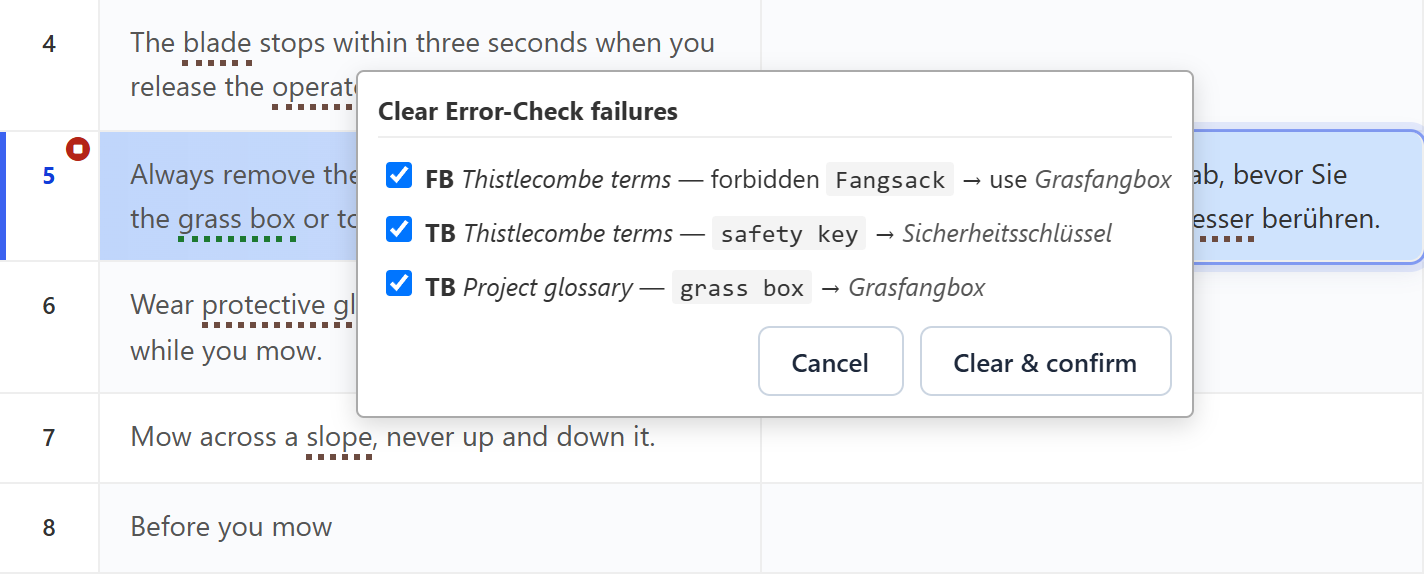
That the segment did not confirm, and that the failures are the translator’s own rules and termbases rather than a built-in suite — dismissing one is a decision kept in the file
A confirmation refused — the stop sign on the row and the Error Check failures listed, each with its own box to dismiss it

The rules are yours, and you test them first.

They come from your own termbases and from regular expressions kept in libraries you attach per project. A rule is tried against a sample before you save it.

Several documents, reviewed as one.

Open the whole delivery and it is one continuous grid rather than a stack of tabs, each file's rows under its own name.
Consistency

See it in the applicationHide the screenshot
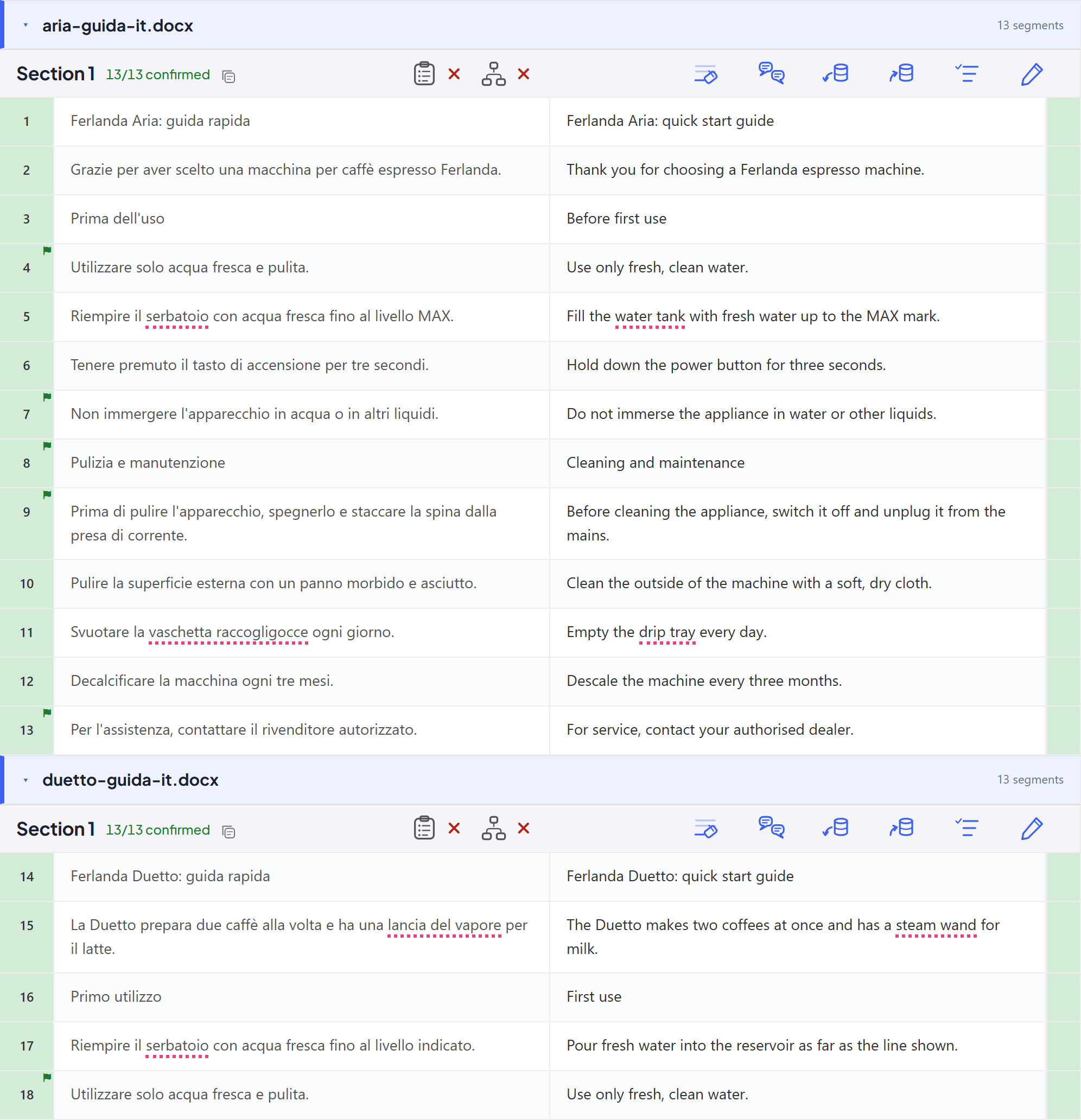
That this is one index across the delivery rather than four tabs: the row numbers do not restart, and each row still names the file it came from
Three files open as one grid — one continuous row index across the set, each file under its own header, a repeat flagged in the first file and again in the second

Every figure in the source, checked in the target. No AI model.

Switch on Checking mode and each row shows whether every figure in its source is in its target, compared by value and read the way each language writes numbers: 1,094,950 shares for 1.094.950 actions passes, and ESRS 8 for ESRS 4 does not. F9 takes you to the next finding, and one you dismiss stays dismissed in the document.

CHECKING MODE · FRENCH TO ENGLISH ON YOUR PC · NO AI MODEL 14 Le capital s’élève à 1.094.950 actions. The capital amounted to 1,094,950 shares. ✓ the same figure, each side read the way its language writes numbers 15 Les informations sont publiées selon ESRS 4. The information is disclosed under ESRS 8. ▲ changed · ESRS 4 in the source, ESRS 8 in the target F9: THE NEXT FINDING · ONE YOU DISMISS STAYS DISMISSED IN THE DOCUMENT

A reviewer of your own

Send it to a reviewer, in the tool they already have.

Send for Review writes a file your reviewer opens in Trados, memoQ or bAIbel AV, and Import Review lists every change before anything is applied. Each change comes back unconfirmed, with the reviewer's comments, for you to confirm.