bAIbelAV
/av/machine-translation07 / 11 · PROCESS

Machine translation

Most machine translation is handed one sentence at a time. That is why post-editing it feels the way it does: the register wanders, a term is right in one paragraph and wrong in the next, and a pronoun refers to something the machine never saw. Not because the AI model is weak — because of what it was given.

This one is given the section, and the briefing that goes with it.

Any AI model you want. The choice is yours.

Thirteen providers and more, and through them a range of models that is close to unlimitedThirteen providers and more, in a catalogue that refreshes itself — plus any open model your own machine or a server on your own network can run, whose name is sent exactly as you give it.. The latest frontier model. An open-source model on your own machine, or on a GPU you rent by the hour in the data centre you pick. Or a sovereign model, run in your own cloud account in the region you choose — which can be your own country. Your key stays on your machine, and an AI model released next month does not wait for a new version of this one.
It translates a section, not a segment.

The unit that goes to the AI model is an authored section of your document, sized by a measured policy rather than by whatever the sentence splitter produced. Everything in that section is translated in one another's company.

The section comes from the document, not from a word count.

Headings, lists, tables, navigation, body copy: the sectioner reads the structure the author actually wrote and cuts along it. There is a maximum size, and it is a guard on top of the structure rather than the thing that makes the cut — so a section is a section, not the first four hundred words.

The machine gets what you would give a colleague.

Before the section is translated, this goes with it: the document summary, the style you set, what this part of the document is for — ordinary prose, a footnote, page metadata, interface strings — any instructions you wrote for that section alone, the translations already made, the termbase hits for the words actually in it, your project glossary, and who the translation is for, if you say.

That is the briefing you would give somebody competent who had not read the file.

EIGHT NAMED THINGS TRAVEL WITH ONE SECTION 1 The document summary generated from the source, then yours to edit 2 The style you set for the whole document 3 What this part is for ordinary prose, a footnote, page metadata, interface strings 4 Instructions for this section anything you wrote for this section alone 5 The translations already made a window of what came before it 6 The termbase hits for the words actually in this section 7 Your project glossary and where the two disagree, the project wins 8 Who the translation is for the reader you describe, if you do One section, cut along the document’s own structure The briefing you would give somebody competent who had not read the file. AND ONE THING THAT IS NOT ON THE LIST Formatting. It is not a ninth item, and it is not in this request at all. What the finished document looks like is the document pipeline, not the briefing — a different mechanism entirely.
The section and its briefing — eight named things going in with one section

The context is an object you can edit, not a setting you accept.

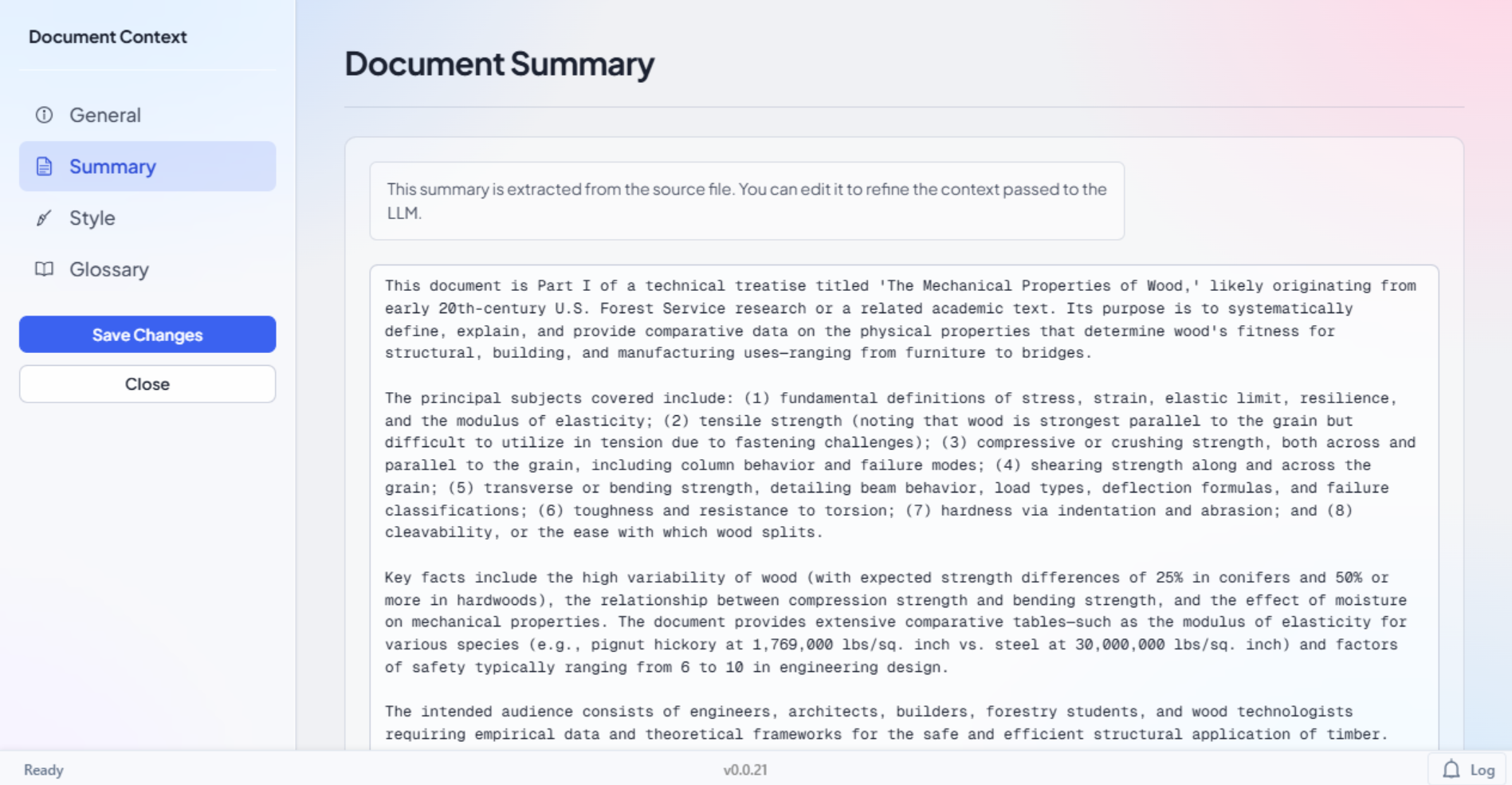
The summary is generated from your source and then handed to you to correct. Alongside it sit the project overview, the style, and the glossary, each editable; and every section carries its own role and its own instructions that apply to it alone. If the machine has misunderstood what the document is, you fix the sentence that told it.

See it in the applicationHide the screenshot
That the summary is generated from the source file and then editable, so a misunderstanding about the document is corrected by editing a sentence rather than by re-running anything. The panel says both halves itself: extracted from the source file, and yours to edit
Document context tabs — General, Summary, Style, Glossary, with the generated summary in its editable field

Your house rules, in every request it sends.

Write a rule once — how dates are written, the register a client expects, a punctuation convention — and say which tasks and which languages it is for; it is added to every request those tasks send, in the order you set, and a project keeps the version it chose until you move it on. If you want to change the briefing itself, what each task sends the AI model is yours to edit: preview it with its blanks filled in before you use it, and pin your version to the project.

And you can read exactly what was sent. The inspector that keeps a copy of each request is off until you switch it on, because that copy holds your client's text; one click clears it.

A table is translated as a table.

Cells go out as a table and come home by identity, each to the cell it came from. If any cell fails to resolve, the whole reply is refused rather than half-written into your document — and a duplicate id is refused rather than guessed at.

YOUR DOCUMENT THE AI MODEL'S REPLY A1 A2 A3 B1 B2 B3 C1 C2 C3 A1 A2 A3 B1 B2 B3 C1 C2 C3 A1 A2 A3 B1 B2 B3 C1 C2 C3 A1 A2 A3 B1 B2 B2 C1 C2 C3 REFUSED. NOTHING WRITTEN.

It reads formatting as what the paragraph displays.

Bold that comes from a style, from the style that style is based on, or from the run itself is all just bold by the time the translation is generated — resolved down the chain the way Word itself resolves it. So the regenerated deliverable carries the source's look rather than the source's markup.

WRITTEN ON THE PARAGRAPH style: Heading 2 Terms of payment NOTHING HERE SAYS BOLD READ DOWN THE CHAIN, AS WORD READS IT Document defaults Calibri, 11 pt Heading 1 bold, 16 pt Heading 2, based on Heading 1 13 pt The text's own formatting nothing of its own WHAT THE PARAGRAPH DISPLAYSbold, 13 ptTerms of payment THE TRANSLATIONZahlungsbedingungen THE SOURCE’S LOOK, NOT ITS MARKUP

Two definitions of one term: yours wins.

Where a term is in both your project glossary and a termbase, the glossary entry wins and the termbase citation is dropped before the request is built. The machine is handed one answer to each question.

THE SAME TERM, DEFINED TWICE YOUR PROJECT GLOSSARYindemnity → Freistellung A TERMBASEindemnity → Schadloshaltung DROPPED BEFORE THE REQUEST IS BUILT THE REQUEST, AS BUILT the section, and its briefing GLOSSARYindemnity → Freistellung the termbase hits for every other term ONE ANSWER TO EACH QUESTION

It shows you the plan before it starts, and what it left after.

Before anything is sent, Auto Translate lists what it will translate and roughly what the calls will cost, for models with a price. By default it keeps what a person has confirmed and every exact or repaired memory match, and a near match goes to the AI model as reference rather than being thrown away. You can stop it between sections and carry on later from where it stopped, paying only for what is left; the report lists every segment it did not translate, with the reason. The file keeps a running total of what its AI calls cost.

THE PLAN BEFORE ANYTHING IS SENT: WHAT IT WILL TRANSLATE, AND A ROUGH COST 1 2 3 · kept 4 5 6 7 8 all confirmed work: kept by default STOPPED 1 2 3 · kept 4 5 6 7 8 STOP “Stopped on request. Everything translated before the stop is saved. Carry on translates section 5to section 8 with the same settings, so the sections already done are not sent again.” Carry on… 1 2 3 · kept 4 5 6 7 8 NOT SENT AGAIN ONLY WHAT IS LEFT, PAID FOR ONCE

What comes back is a proposal.

Machine output arrives where you can see it, compare it and take it or leave it. The points where machine work enters the deliverable are places a person decides — that is true of translation, of terminology, of proposed edits and of the export gate, and it is the same rule in each.

Agentic Editing