bAIbelAV
/av/integrations06 / 11

Integrations

The best open-source tools for translators, in one place, ready to use.

The open-source world has excellent tools for the jobs around translation — reading PDFs properly, running a language model on your own machine, transcribing speech. The Integrations screen brings them into the tool you translate in, and a configuration template for each means you choose what you want rather than working out how to wire it up.

In numbers

3kinds of service: models, document reading, speech
13+model providers
0API keys needed for a server you run

A template for each, so you are not configuring from scratch.

Pick what you want to run — an AI model server on this PC or your network, an open model on a GPU you rent, your own cloud endpoint, a document reader for PDFs — and the template fills in the address, the protocol and the paths. You add what only you know, and test it before you save it.
CHOOSE A TEMPLATE An AI model server on this PC or your network Apertus 8B (Swiss open model, vLLM) Custom model — Pod (vLLM) Docling Serve (official) Local pdf4llm OCR Ollama listens on 11434, LM Studio on 1234, llama.cpp on 8080: change the port if yours differs. A MODEL SERVER ON THIS PC OR YOUR NETWORK BASE URL http://localhost:11434FROM THE TEMPLATE INFERENCE PATH /v1/chat/completionsFROM THE TEMPLATE HEALTH PATH /v1/modelsFROM THE TEMPLATE API KEY only if the server asks for oneYOURS, IF ASKED Test Connection Success TESTED BEFORE YOU SAVE MODEL ON THE SERVERgemma3:12b▾also qwen3:14b, llama3.1:8b YOU PICK listed by the server: no name to type

Language models on your own machine, or on a GPU you rent.

Point it at an AI model server you already run — Ollama, LM Studio, llama.cpp — and the connection test lists the AI models on it, so you pick one rather than type its name. Or rent a GPU by the hour and run an open model on it, from Gemma and Qwen to ApertusThe open multilingual model from the Swiss AI Initiative (EPFL, ETH Zurich, CSCS), Apache 2.0 — offered on a rented GPU, including a provider with a Swiss zone., or any AI model you name. Nothing about your work leaves the machines you chose.

PDFs read by the tools built to read them.

A PDF is prepared before it is translated, and the reader is yours to choose: Docling on your own machine, the official Docling server, or pdf4llm. The result is a file the ordinary import reads.

Run the AI models where you want them.

Point it at a commercial provider, at a machine on your own network, at a GPU you rent by the hour, or at an endpoint in your own cloud account. Endpoints you run yourself do not need an API key.

The provider and model list updates itself.

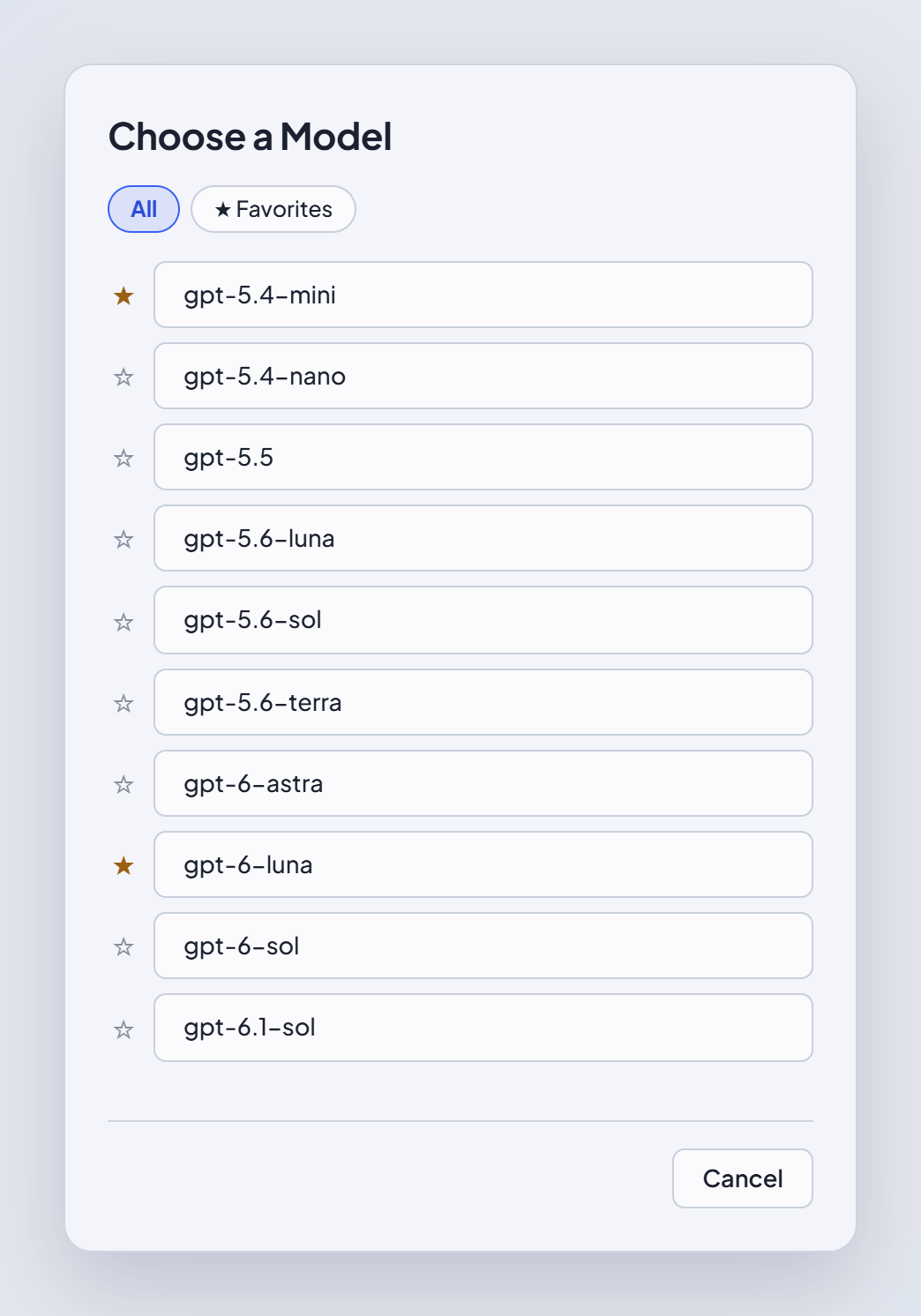
The list is a published catalogue refreshed when the application starts, so a new model appears without a new version of AV. Models you have starred are kept separately and survive the refresh.

See it in the applicationHide the screenshot
That the translator's own choices are kept: starred models stay starred, filterable as ★ Favorites. The catalogue refresh is claimed by the text, not by this figure (no refresh can be caught on screen)
The AI model picker — starred models (★ Favorites) beside unstarred ones

Set up properly, from the first run.

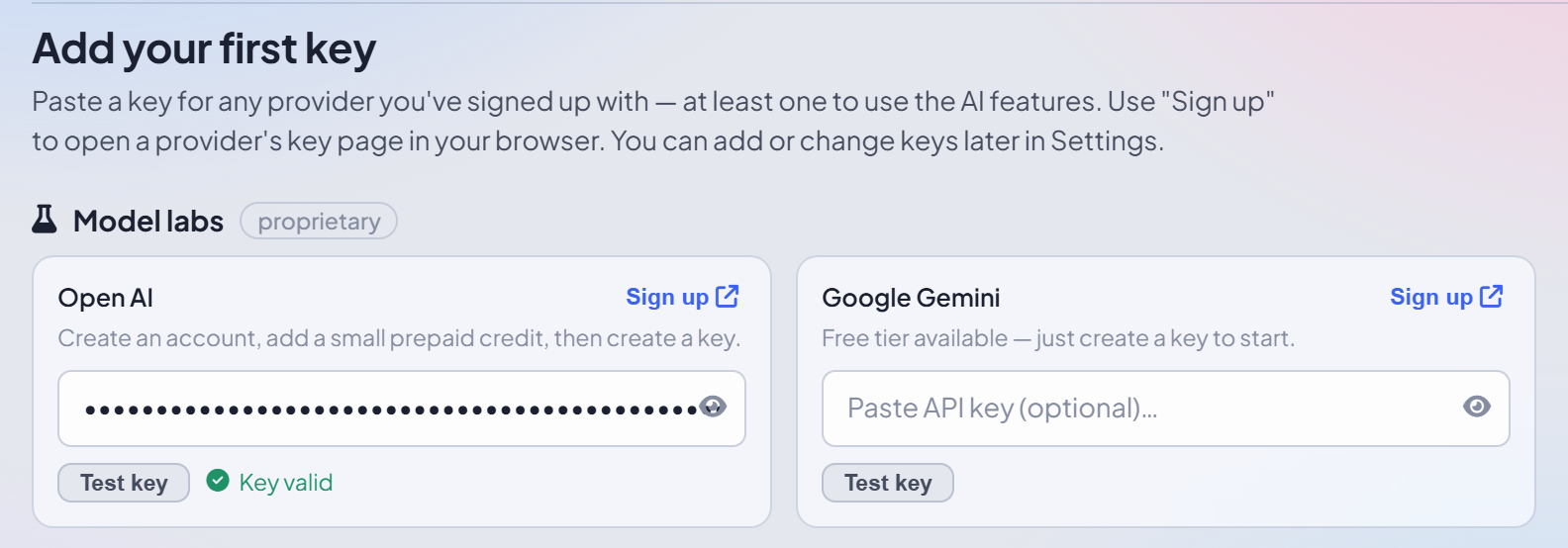
The first run walks through storage, options and keys, and lets you test each key as you add it. The provider list it offers comes from the application itself, so it is always current. Any key you skip, or one for a provider you take up later, can be added in LLM Configuration whenever you need it. Every key is kept in an encrypted file on your PC, and the key to that file is locked by Windows to your own Windows sign-in, the protection Windows itself uses for saved passwords: only you, signed in on this PC, can open it.

See it in the applicationHide the screenshot
That a key is tested where it is entered rather than failing later in the middle of a job
The first-run wizard, Keys step — one provider’s key tested and reporting back

Say what each endpoint is, once.

Every integration that receives document content carries a label you set: Internal, inside your network; External · private, with a provider you contract; or External, a third party. The application proposes one from the endpoint's shape and you confirm it — and if a project that protects nothing is about to send to an External endpoint, it tells you so, by name.

YOUR NETWORK bAIbel AVyour text, on this PC INTERNAL ✓ stays on your network Ollama on this PC LM Studio on the office server EXTERNAL · PRIVATE ↗ leaves your network provider you contract Apertus 8B on a GPU you rent by the hour Your endpoint in your own cloud account PROPOSED · YOU CONFIRM EXTERNAL ↗ leaves your network Corvel AI a commercial provider ↗ ⚠ This project protects nothing, and sends to an External endpoint: Corvel AI.A WARNING, BY NAME