Twenty-eight formats in, and every one back out.
- DOCX
- PPTX
- XLSX
- IDML
- HTML
- Markdown
- SVG
- XML
- JSON
- YAML
- CSV
- plain text
- SRT
- VTT
- PO
- RESX
- ARB
- TOML
- .properties
- Qt TS
- stringsdict
- PHP arrays
- Android XML
- iOS .strings
- XLIFF 1.2
- XLIFF 2.0
- SDLXLIFF
- MQXLIFF
What it opens, what it writes back out, and what survives the trip. The list is first because that is what you came for.
XLIFF 1.2 and XLIFF 2.0 open and export like any other format on the list. If your client's tool speaks standards rather than its own dialect, that is the door.
.sdlxliff and .mqxliff open and go back out, carrying inline formatting — including formatting you added yourself, which is normalised to the shape memoQ expects rather than left as something its importer will silently delete.
And a segment somebody confirmed returns confirmed. The status is read on the way in and written back on the way out, in each tool's own vocabulary, so a reviewer opening the returned file sees finished work as finished rather than as a file nobody has touched.
.sdlxliff is a file this opens. A Trados project package — .sdlppx — is not, and neither is its return package. If your agency sends packages rather than files, ask them for the bilingual file inside; that is the unit this works with.
Paste one address or a list, and each page is fetched as a browser shows it and imported like any other file, with the address it came from recorded; for a page behind a sign-in, sign in first. Two addresses that land on the same page are imported once, and if every page comes back identical — the same sign-in screen, usually — you are told. When the page changes, fetch it again from the same address and translate only what changed.
SRX segmentation for 66 languages. English, French, German, Italian, Spanish, Polish, Chinese, Russian and Arabic have full rule sets; the other 57 have basic ones — the language's own sentence-ending punctuation, decimals, ellipses, initials and common abbreviations. Word counts treat each Chinese, Japanese and Korean character as its own unit rather than splitting on spaces that are not there.
A language with no rules of its own is segmented with English rules. The file records that it was, and the import tells you so.
Select the files and choose Analyse. Every segment is counted once, as a repetition, a context or exact match, a fuzzy match or no match, against the project's memories and the files' own earlier text; the report has a combined table, one per memory, and one per document when there are several. The fuzzy bands are yours to set, for the project or as your default for new ones, and the report prints which bands it used.
When a file you import contains the same passage twice, AV tells you how many of its words are a second copy, so a doubled document does not inflate the count unnoticed.
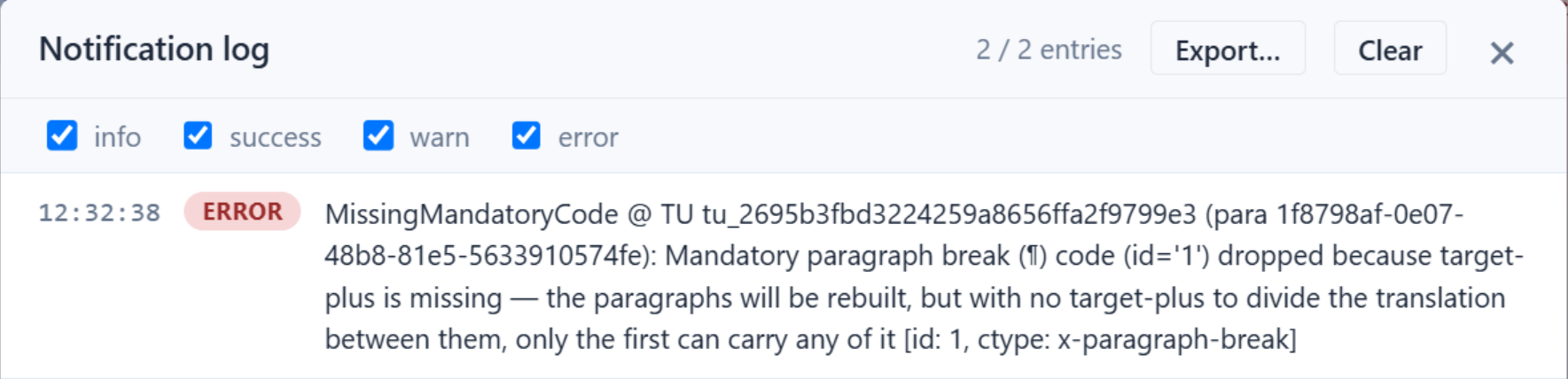
A mandatory code missing from a target fails the export validator, and nothing is written: the check runs before the file does, so there is no half-good deliverable to find later. Trados and memoQ files are the exception: they go out with a warning, because the code can be settled in that tool.
The refusal names the segment it stopped on, names the code, and says what the missing code would have cost — a paragraph break left out of the target means the paragraphs are rebuilt, but only the first can carry any of the translation — and, when there is a code to place, where to put it. A summary says how many; the notification log carries one entry per segment, with a button that takes you to it, and a report is written beside the project file.
Every deliverable it writes carries every code your source had.

Formatting you have no reason to see while you translate — a font size, a colour, a typeface — is carried through Word and PowerPoint files untouched and written back on export, and a PowerPoint's text goes back into the shape it came from. A Trados, memoQ or XLIFF file keeps the segmentation it arrived with: AV never re-segments a bilingual file.
Import a TMX into any memory, and export one written in Trados's TMX dialect, memoQ's, or both at once, so nothing you put into a memory stays only in this tool. Each memory in a project can carry a penalty, so matches from one you trust less rank below the rest.
Filter a memory by language, document, who made or changed an entry, or any text. Correct entries, find and replace with a preview you can untick row by row, change a language variant, delete what you filtered, or export just that set. Nothing reaches the memory until you commit, and a backup is taken first.