bAIbelAV
/av/translation04 / 11 · PROCESS

Translation

The grid, the shortcuts, the codes, the filters — all of it, and none of it reinvented.

This is the part that decides whether you could work in it on Monday. If you have been translating for fifteen years, you already know what you need on screen and what you need under your fingers. The question is only whether it is all here, and whether anything you rely on has been quietly left out.

You should not have to learn a new way to do the thing you already do well.

In numbers

2views of every segment
66segmentation languages
28formats back out

Codes out of your way, or codes in front of you.

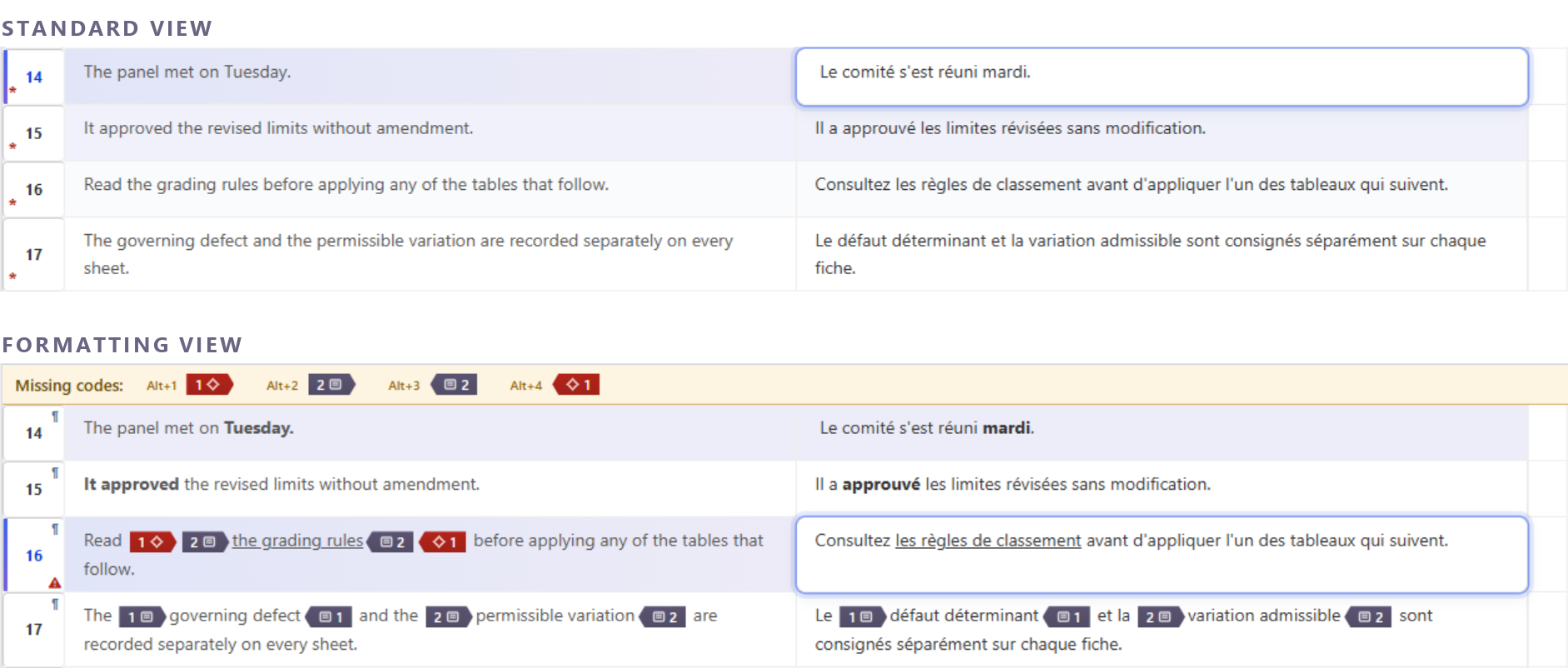
Two views, and the toggle is one button. Standard View is plain text: no tags, no chips, just the sentence you are translating. Formatting View shows bold and italic as bold and italic, and every other code as a labelled chip you can select, copy and move like a character. The same segment, the same file, whichever way you prefer to see it.

See it in the applicationHide the screenshot
That the file round-trips either way, and that target-plus seeds plain text with no codes — the translator places them, and the strip is what makes that safe
Standard View and Formatting View, the same four segments, stacked — with the missing-codes strip live in the lower half

Translate in plain text, and place the formatting when you are ready.

A segment opens with the text and none of the codes, and they go in afterwards — except formatting that wraps the whole segment, which is carried across for you. Before you leave the formatted view, the tool tells you how many segments carry formatting you placed. Edit one of those in the plain view, and its formatting is rebuilt from the source's when you come back, with a count of any that lost formatting, for you to review.

Tags placed automatically.

Translate without the codes and the vast majorityMeasured on a real 83-segment document: every code went back in with nothing to place by hand — 79 segments by rule, the last 4 by the AI model. go back in for you. Rules that read the source's structure place most of them; the few the rules cannot settle go to an AI model, which sees the segment with your project's stand-ins in place, exactly as every other request is.

Every placement is then checked by a separate tag checker. A segment it has any doubt about is marked for you to look at, with the reason on hover, rather than passed as done.

Filter to the rows you are working on.

Filter on source, target or both, as plain text or a regular expression, then narrow by status and checks: unconfirmed, empty, missing a tag, or failing a term or rule. Each condition narrows the same view, and Ctrl+G can jump to the next match instead of hiding the rest.

Source payment ^Payment.*\d+ days Target Regex Status & checks… Unconfirmed Missing tags 6 SEGMENTS4 OF 63 OF 62 OF 61 OF 6 SourceTarget Payment is due within 30 days.Zahlbar innerhalb von 30 Tagen. Prices exclude VAT.Preise zzgl. MwSt. Payment is due within 14 days of delivery. Late payment incurs interest.Verzugszinsen fallen an. Payment is due within ‹1›60 days‹/1›.Zahlbar innerhalb von 60 Tagen. Delivery is free within the EU.Lieferung innerhalb der EU frei.

Dictate into the cell, and choose who hears it.

Once set-up is complete, hold Ctrl+Shift+Space, speak, release. The transcript lands at the caret — replacing a selection if you made one — in Standard View or Formatting View, because the cell is editable in both. Who transcribes it is yours: a cloud Whisper, or a Whisper server on your own network, which costs nothing per minute and sends the audio nowhere. Until you set one up, the shortcut tells you where to do it.

A dropped code is caught, and the refusal tells you what to do.

Mandatory codes cannot go missing quietly: an export refuses while one is unplaced (a Trados or memoQ file warns instead), and F8 walks you to the next segment that still has one. Working without codes on screen is not the same as losing them. And the refusal is not "validation failed" — it names the code that is missing, the segment it belongs in, and, when there is a code to place, where to put it.

Correct the source. The client's file is not touched.

Right-click a source cell to fix a typo or a broken sentence: the original is kept in History, one click puts it back, and a translation already in the segment drops to draft so you look at it again. The correction is yours alone: an export writes your translation into the client's file, never your change to their source.

CLIENT'S FILE SOURCE TARGET The tenant must give notcie notice notcie in writing. Le locataire doit notifier par écrit. CONFIRMED DRAFT: LOOK AGAIN HISTORY: notcie EXPORT: YOUR TRANSLATION NOT YOURCORRECTION

Confirm once. The repetitions follow, and the memory stays in step.

Confirm a segment and every repetition of it that nobody has worked on takes the same translation, in this file and in every file you have open with it; one already translated or confirmed is left as it is. Confirming also writes to your memory, and a segment you change afterwards is marked until it is sent again, so you can send just those in one go.

1 · YOU CONFIRM ONE SEGMENT. ITS UNTOUCHED REPETITIONS FOLLOW, IN EVERY OPEN FILE the same source in every row: The goods remain our property until paid in full. contract.docx · 4 Die Ware bleibt bis zur vollständigen Bezahlung unser Eigentum. you confirm it contract.docx · 9 Die Ware bleibt bis zur vollständigen Bezahlung unser Eigentum. takes it · confirmed annex.docx · 2 Die Ware bleibt bis zur vollständigen Bezahlung unser Eigentum. takes it · confirmed annex.docx · 7 Die Ware bleibt bis zur Zahlung Eigentum des Verkäufers. already translated · left as it is Your memory written when you confirm 2 · LATER YOU CHANGE IT. IT IS MARKED UNTIL YOU SEND IT AGAIN contract.docx · 4 Die gelieferte Ware bleibt bis zur vollständigen Bezahlung unser Eigentum. * Edited since last TM write — TM entry is out of date for this segment. Send Segments to TM ☑ only those edited THE MEMORY ENTRY STAYS AS IT WAS UNTIL YOU SEND THE SEGMENT AGAIN